

Growth For Altimeter and the other
Ebook download and sell test
- Best in the World
- Best in the World
- Best in the World
Full Description
Setup
Getting API keys from Code Inspector
You need an APU Token from Code Inspector. Log on Code Inspector using your GitHub, GitLab or Bitbucket account.
Then, in your preferences, generate a new API key as shown below.
Your access and secret keys are then generated: all you need is to add them to your VS Code Plugin configuration.
Note: use API token and no API keys. API keys (found in profile) are deprecated and will be removed in future versions.
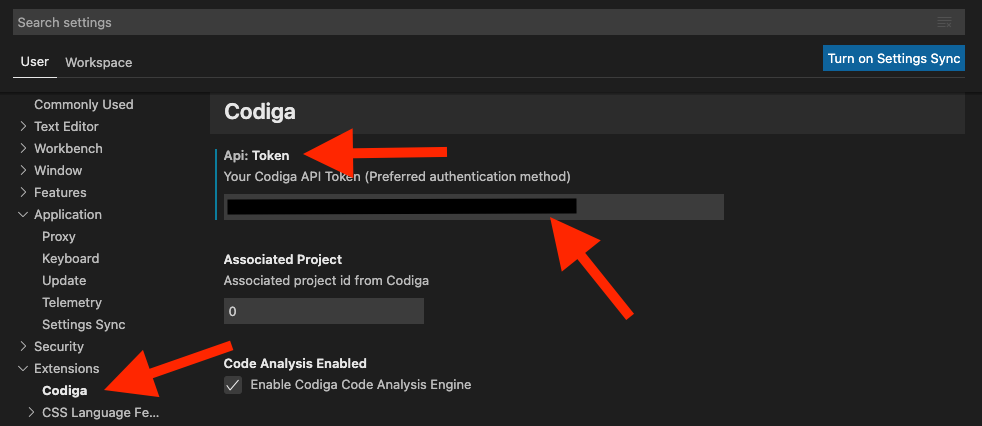
Add keys in the VS Code extension
Enter your API keys in your VS Code extension, as shown below.
Using Code Inspector in your CI/CD pipeline
You can run the same rules in your codebase during your CI/CD pipeline and/or automate your code reviews.
You can easily integrate Code Inspector with
- GitHub using the GitHub App integration
- Bitbucket using the Bitbucket App integration
- Any other CI/CD pipeline (see our documentation)
Sending feedback
You can either fill a bug report directly. If you do not want to open a ticket, you can also directly contact us.
Release Notes
Version 1.1.2
- Support new API tokens
Version 0.0.2
- More documentation
- New bundle package
Version 0.0.1
- Initial release